Marketplace
STP on FacebookSTP on TwitterSTP on LinkedInSTP on Instagram

Products

  • Advoware
  • Creditor Hub
  • Documents
  • Knowliah
  • Lexolution
  • Smart Data
  • Winjur
  • Winmacs
  • Winsolvenz

Solutions

  • Law Firms
  • Insolvency Advisor
  • Legal Departments
  • Large Creditors

Resources

  • Events
  • Webinars
  • Downloads
  • Case Studies
  • Academy

Company

  • About Us
  • Careers
  • MediaKit
  • Contact Us

© 2024-2026 STP Informationstechnologie GmbH

Legal NoticePrivacy PolicyTerms of Service

MaraDocs

MaraDocs solves a time-consuming problem in the legal secretariat: Family, labour and traffic law firms in particular receive a large number of documents by e-mail, which were simply photographed by the client.

Marketplace
PartnerContact
Marketplace/MaraDocs

Maramia GmbH

MaraDocs

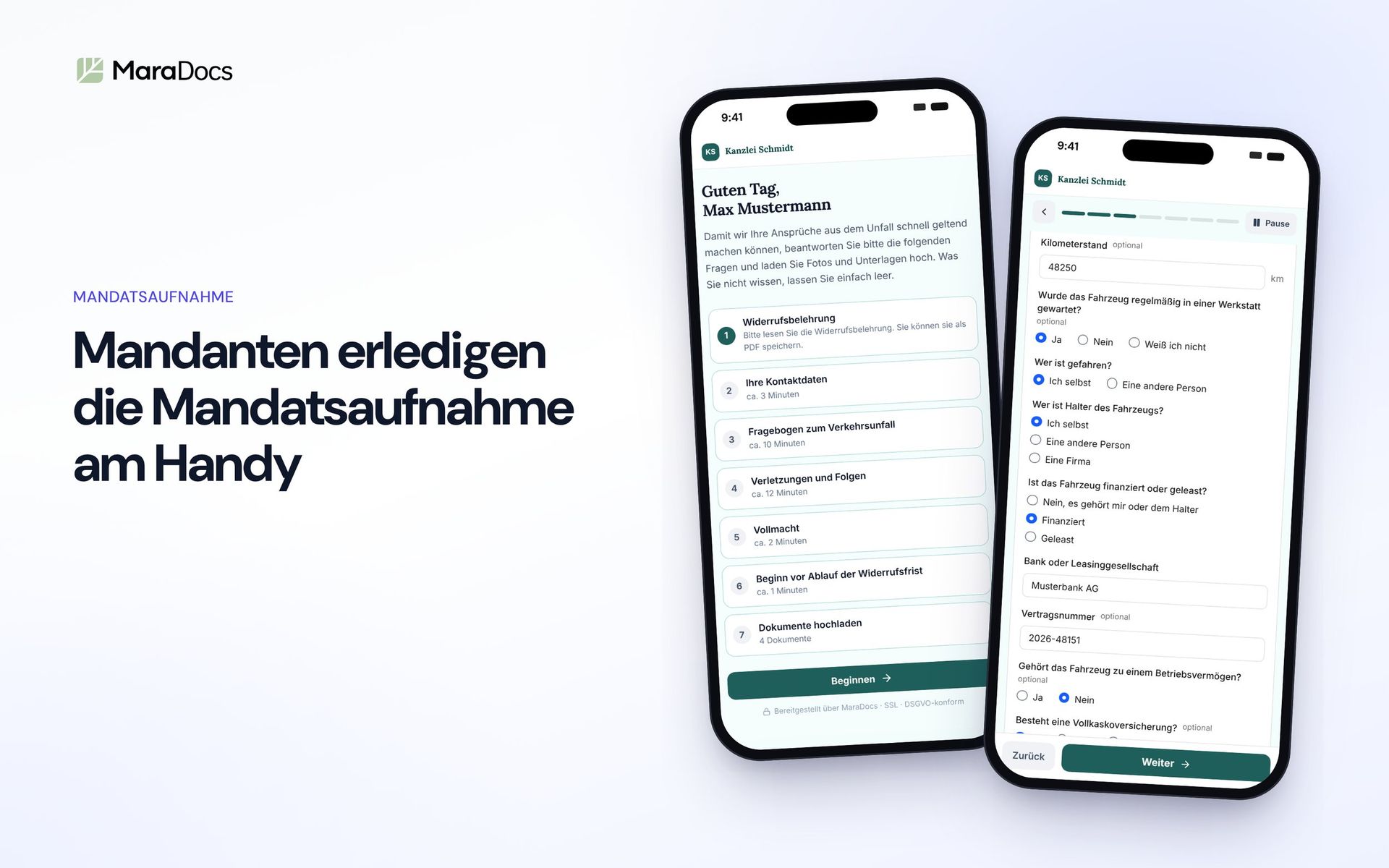
MaraDocs does the work before a document reaches the case file. In the portal, clients fill in questionnaires on their phone, sign the power of attorney and upload their documents. The workspace turns phone photos and e-mail attachments into clean, searchable PDFs that you file in Advoware as usual.
MaraDocs
MaraDocs
Enterprise team or larger law firm?
From 8 users (on request)
Registry licence
Law firm license M (up to 7 employees)
Payment cycle
Monthly payment
Vertragslaufzeit
12 Monate

Your price

€ 59.00€ 47.79

monthly

plus VAT

Request Consulting
Your advantage with Septeo

Only for stp.one customers 10% on the annual license in the first contract cycle. The discount is automatically deducted in the shopping cart.

Important noteFor existing customers and more than 8 users, please use our individual consultation.

One account for the work before the case file

Clients send documents as crooked phone photos, questionnaires come back printed and scanned, and the secretariat keeps chasing until everything is in. MaraDocs takes over these steps. Your practice management software stays as it is.

Included in the licence: Portal, Workspace and OnPage.

Portal

Client portal

Questionnaires, power of attorney and documents arrive digitally from the client, with a client file, reminders and 46 request packages with over 50 ready-made templates.

Workspace

Document processing

Phone photos, e-mail and WhatsApp attachments become cropped, rotated, compressed and searchable PDFs.

OnPage

AI chat for your website

Mara answers questions on your law firm website from your own content and takes in enquiries in a structured way.

View live demoRequest a consultation
MaraDocs Portal

Client intake without PDF ping-pong

You send your client a link. They fill in the questionnaires on their phone, sign the power of attorney and photograph their documents. Everything ends up processed in the client file.

Live demo: the real client flow. Entries are not saved.

Try it yourself: the traffic accident request

This is how your client sees a request from the MaraDocs Portal. The traffic accident package asks for personal details, the course of the accident and injuries, collects the signed power of attorney and requests photos of the damage and the vehicle registration. Click through it just as your client would on their phone.

If something is still missing after the first appointment, the portal reminds the client automatically, with this package every three days and at most twice.

File in the law firm view of the MaraDocs Portal with requests, documents and history
The file in the law firm view.

A client file that lasts

Every client gets protected access to their file. They sign in with a code they receive by e-mail, no password or app needed.

  • You see requests, submitted documents, questionnaires and the history in one place.
  • The client sees what is still open and uploads further documents later.
  • You provide information sheets or the cancellation notice, with read confirmation if you wish.
  • You write messages directly in the file instead of by e-mail.
Traffic accident request package in the template store of the MaraDocs Portal
View a package and adopt it.

46 request packages with over 50 ready-made templates for 12 areas of law

Each package bundles a questionnaire, a document list and a matching power of attorney, from traffic accidents through unfair dismissal claims and divorce to disclaiming an inheritance. Your firm details are already filled in.

  • Traffic law, employment law, family law, tenancy law, social law, criminal law, asylum and residence law, inheritance law, debt claims, consumer law and more
  • Adopt with one click and adapt freely
  • Build your own questionnaires in the editor, with conditional questions, signature and pre-filling
  • Make existing PDF forms, such as your power of attorney, fillable in a few clicks

The templates are included in the licence. They are suggested wording, so please check every template before use.

Document upload in the MaraDocs Portal on a smartphone
Documents straight from the phone camera.

Documents by phone, processed automatically

You request each document individually, with a short instruction. The client photographs it with their phone camera or picks it from the gallery or files. If they are at a computer, they switch to their phone via QR code.

Every file is scanned for malware, cropped, straightened, reduced in size and made searchable. Several photos of one document become a single PDF, ready for the beA and your practice software. The original is kept.

Settings for your own sender domain in the MaraDocs Portal
E-mails from your firm’s address.

Reminders from your firm’s address

As long as questionnaires or documents are missing, the portal reminds your client by e-mail, at the rhythm you set per package. Automatic reminders only go out on working days between 8 am and 6 pm and stop as soon as everything is submitted.

Invitations, reminders and messages come from your own domain, for example requests@your-firm.com, with your logo and your colours. We show you the required DNS entries step by step.

Questionnaire editor in the MaraDocs Portal
Questionnaire editor with AI assistant.

On your website and in your clients’ language

With a code snippet, your law firm website gets a button for new clients. Prospects choose their matter and start the intake themselves, around the clock. It works with WordPress, TYPO3, Webflow, Wix and any other website that allows HTML.

The AI assistant in the editor translates a questionnaire into practically any language, such as Turkish, Arabic, Ukrainian or Polish, or rewrites it in plain language. You see every change before you accept it. The AI runs on endpoints in the EU, and your content is not used for training.

MaraDocs Workspace

Client mail becomes clean PDFs

For everything that does not come through the portal: e-mails with phone photos, WhatsApp images, scanned stacks. The workspace processes them in seconds.

A client e-mail with two crooked phone photos, next to the finished, straight and searchable PDF
A client e-mail becomes a clean PDF.

Optimised PDFs from e-mail attachments in seconds

Drag a client e-mail from Outlook into the workspace. MaraDocs unpacks all attachments, including from .msg and .eml files and Apple photos in HEIC format, and scans them for malware.

Even easier with MaraMail: your firm gets its own address at MaraDocs. E-mails you forward there are processed automatically, and the finished PDFs come back if you wish.

MaraDocs Workspace: documents in phone photos are detected, cut out and rotated
Detect and crop documents in photos.

Trash in, Scan out

Your clients send 60 pages of investigation files as single photos, each page rotated differently? MaraDocs detects the documents in the photos, crops them, straightens them and rotates every page by the text direction.

  • Drag and drop pages into the right order
  • Decide freely how many PDFs the attachments become
  • Large files are reduced in size automatically
Handwritten note as a PDF: a handwritten sentence is highlighted, the search finds the word Lindenstraße
Handwriting becomes searchable too.

Searchable PDFs, even for handwriting

Every file runs through our AI text recognition, trained on German-language documents and on handwriting. You select text directly in the PDF, copy personal details and find documents again through search.

Some handwriting stays hard to read even for the best text recognition.

MaraDocs Workspace: annotating a PDF with text box, arrow and properties bar
Label and mark up PDFs.

Label and mark up PDFs

Insert text, draw freely, highlight passages, add arrows: directly in the workspace, without a second PDF program. With the TT tool you add “Annex 1”, “Annex 2” and so on to further pages with one click, counted up automatically and in the same position.

MaraDocs extension in WhatsApp Web: select images from a chat and import them into MaraDocs
Import images from WhatsApp Web.

Import images from WhatsApp with one click

Many clients prefer to send documents via WhatsApp. With our free extension for WhatsApp Web in Chrome and Edge, you import the images of a chat directly into MaraDocs and turn them into PDFs. From the WhatsApp desktop app, you drag images into the workspace.

Get the extension in the Chrome Web Store

MaraDocs OnPage

Mara answers questions on your website

Live demo: chat of a sample law firm. Chats are deleted after 24 hours.

An AI assistant that knows your firm

Mara reads the pages and blog posts of your law firm website and answers visitors’ questions on that basis. She points out that she is an AI and does not give legal advice.

Mara takes in enquiries in a structured way, for a traffic accident for example the location, injuries and police report. You exclude areas of law that you do not accept online. Every enquiry arrives with a summary in your MaraDocs inbox and by e-mail. If it fits, you send the prospect the link to a portal request.

Embedded with a code snippet. The AI runs on Mistral, and the data stays in the EU. The quota includes up to about 150 conversations per month.

Fits alongside Advoware and any other practice software

MaraDocs does not replace practice management software. It does the work before it: collecting documents, chasing, processing photos. In the end you have compressed, searchable PDFs that you file in the Advoware case file as usual or send via the beA. MaraDocs runs in the browser, on servers in Germany, with a data processing agreement under Art. 28 GDPR. It was developed by a lawyer who has worked with Advoware in his own firm for many years.

A direct connection to Advoware is in preparation.

Request a consultation

At a glance

Included in the licence
MaraDocs Portal, MaraDocs Workspace, MaraDocs OnPage
Provider
Maramia GmbH
Use
In the browser, no installation. Clients need no app and no password.
Hosting
Servers in Germany, encryption in transit and at rest
Data protection
Data processing agreement under Art. 28 GDPR included, no use of your content for AI training
Templates
46 request packages with over 50 ready-made templates for 12 areas of law, included in the licence
File formats
Photos (including HEIC), PDF, e-mails (.msg, .eml); in the portal, depending on the request, also Office documents and videos
Practice software
Complements Advoware and other practice software; filing of the finished PDFs as usual
Website
Portal button and OnPage chat via code snippet, e.g. WordPress, TYPO3, Webflow, Wix
Browser extension
WhatsApp Web Image Exporter for Chrome and Edge, free of charge
Contact
info@maradocs.io

Frequently asked questions

Do I have to change my practice software?

No. MaraDocs complements Advoware and other practice software. You file the finished PDFs and the completed questionnaires in your case file as usual.

Do my clients need an app or an account?

No. Clients open the link in the browser, on their phone or computer. For the permanent client file, they sign in with a code they receive by e-mail. No password is needed.

Where is the data processed?

On servers in Germany, encrypted in transit and at rest. A data processing agreement under Art. 28 GDPR is included. The AI functions run on endpoints in the EU, and your content is not used to train models.

Are Portal, Workspace and OnPage included in the licence?

Yes. The licence includes Portal, Workspace and OnPage, as well as the 46 request packages with over 50 ready-made templates from the template store.

How do I get started after purchase?

After your firm licence is activated, you receive a welcome e-mail. You sign in at app.maradocs.io with the e-mail address you gave at purchase. You do not need a password, you receive a login link by e-mail. You invite further staff under Settings, Licence.

Are the templates legally reviewed?

The templates are carefully prepared suggested wording, but not legal advice. Please check every template for your cases before use. Every adopted template is your own copy, which you adapt freely.

Can I try MaraDocs beforehand?

You can click through the traffic accident request at the top of this page yourself. For a demonstration with your own documents, use “Request a consultation”.

Licence noticeThe level of the law firm licence depends on the number of full-time employees of the customer’s law firm, regardless of the actual number of users of the software. The customer is obliged to state the correct number truthfully when concluding the contract and to notify immediately any changes that justify a higher licence level. The provider is entitled to verify the number at any time by requesting information. If it turns out that the actual number requires a higher law firm licence, the licence will be adjusted accordingly from the beginning of the current billing period..

Calculate your savings now

Related Products

  • Advoware
  • Septeo CNEEAdvoware API
  • Advoware
  • Septeo CNEEAdvoware API